terraform
Feb 25, 2026
Stop Storing Cloud Credentials in Terraform State
Introduction Terraform state files contain everything Terraform needs to manage your infrastructure. That includes any cloud credentials you use to...
Read ArticleIf you’ve been using Terraform for a while, you probably think of it as a tool to provision new infrastructure. That’s true, but it’s also capable of managing...
If you’ve been using Terraform for a while, you probably think of it as a tool to provision new infrastructure. That’s true, but it’s also capable of managing existing resources that were created outside of Terraform.
This is where the import block comes in. With it, you can pull existing resources into Terraform’s state so you can manage them as if Terraform had created them from day one.
In this guide, I’ll walk you through:
import block to bring that VPC into Terraform stategenerate-config-out to auto-generate Terraform configurationAdopting Terraform doesn’t mean always starting from scratch. If you already have a production VPC, subnets, route tables, or other infrastructure running, you can still gain all the benefits of Infrastructure as Code:
Before Terraform can import an existing resource, it needs to know what it’s importing. That means creating a matching resource block.
resource "aws_vpc" "production" {
  cidr_block           = var.cidr_block
  enable_dns_hostnames = true
  enable_dns_support   = true

  tags = {
    Name = "import-vpc"
  }
}
Tip:
cidr_block.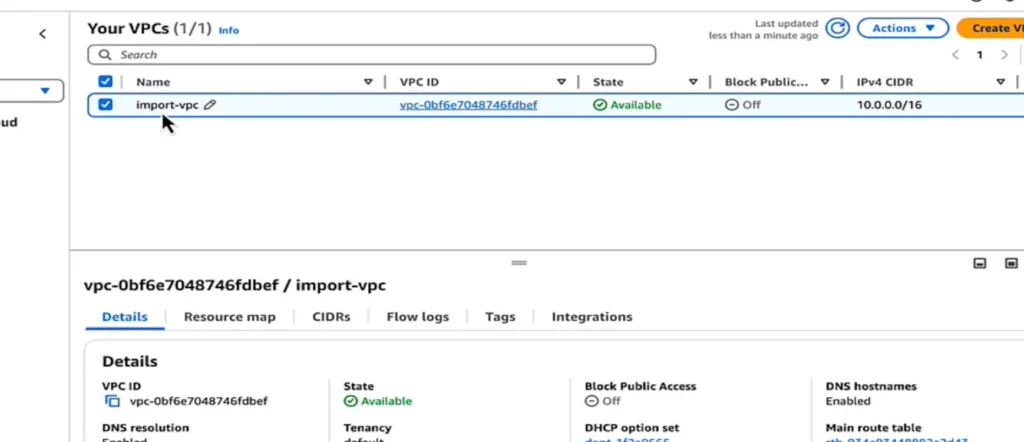
The import block tells Terraform:
import {
  to = aws_vpc.production
  id = "vpc-1234abcd"
}
to = the Terraform resource name (aws_vpc.production in this example).id = the AWS VPC ID from the AWS Console.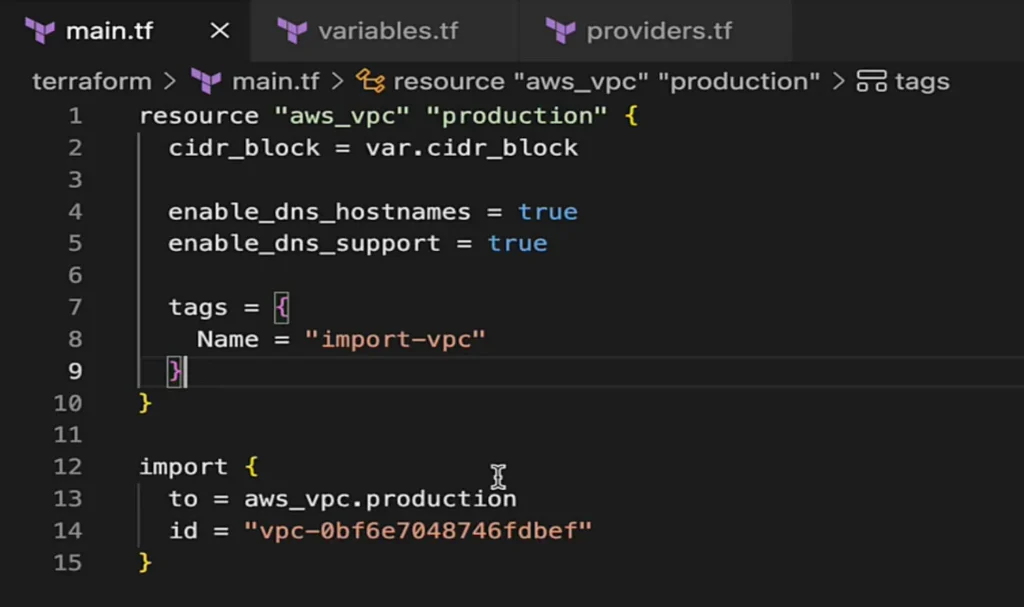
Once your resource and import blocks are ready, run:
$ terraform init
$ terraform validate
$ terraform apply
Terraform will:
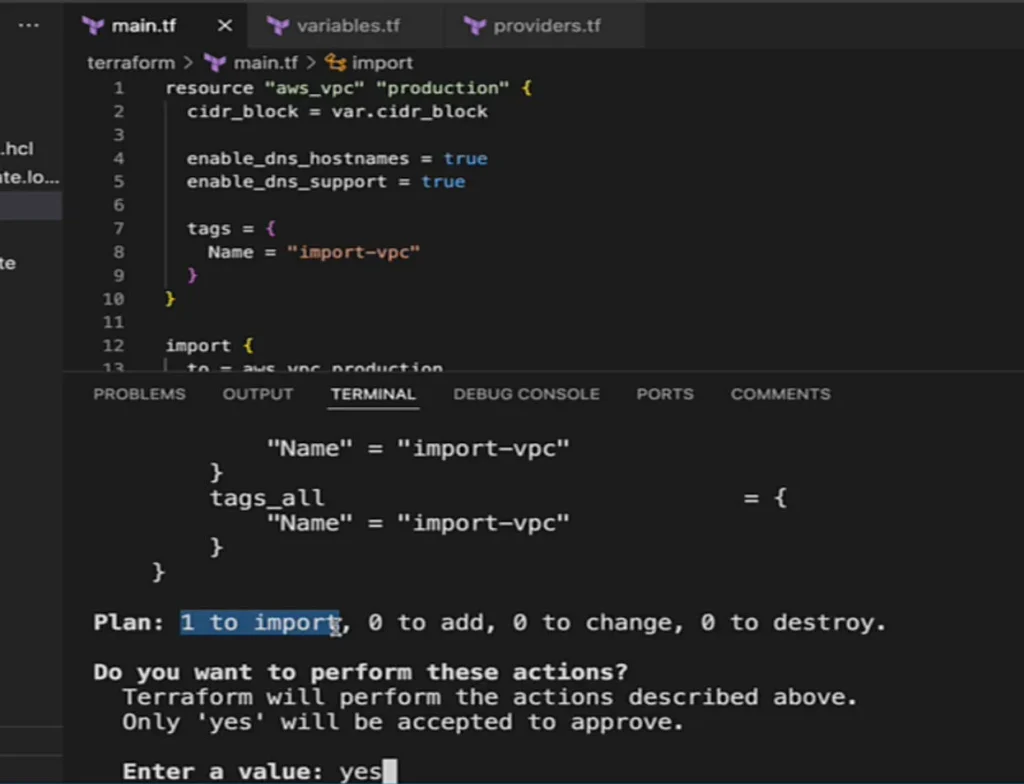
After the resource is imported, you no longer need the import block so you can remove or just comment it out.
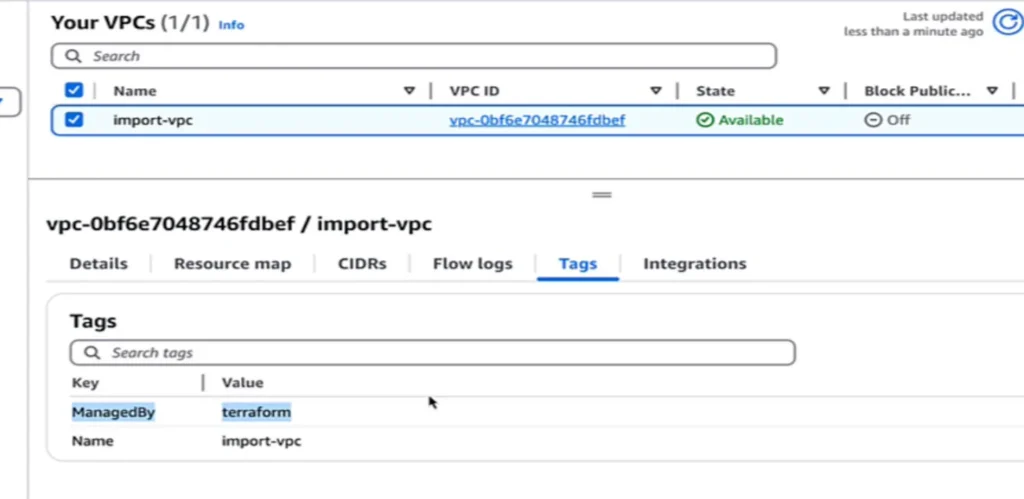
To verify Terraform control, modify your resource block. For example, add a ManagedBy tag:
tags = {
  Name      = "import-vpc"
  ManagedBy = "Terraform"
}
Run:
$ terraform apply
In the AWS Console, the new tag should appear, which is proof that Terraform is managing the resource.
generate-config-outFor more complex resources, Terraform can generate the configuration for you:
$ terraform plan -generate-config-out=subnet.tf
This creates a .tf file containing the resource block for the existing resource. You can then:
.tf files.This feature is still marked as experimental, but it’s a huge time-saver.
generate-config-out – remove unnecessary arguments.for_each for bulk imports – useful for importing multiple subnets or route tables at once.terraform import)Using the import command can give you benefits such as:
terraform plan and only write to state on apply which is perfect for PR review and change control. You don’t get the same validation using terraform importGotchas to keep in mind:
-generate-config-out produces.Quick contrast: the terraform import CLI is fine for one-off fixes, but it writes to state immediately, is less CI/CD-friendly, and imports one resource at a time (no bulk semantics), making it harder to review and automate at scale.
The Terraform import block makes it possible to:
If you’re moving from manual management to Terraform, importing is one of the most valuable steps you can take to get all your infrastructure under one management tool without starting from scratch.
Keep Reading
Introduction Terraform state files contain everything Terraform needs to manage your infrastructure. That includes any cloud credentials you use to...
Read Article
You’ve automated Terraform deployments in CI/CD pipelines with GitHub Actions or Harness, but have you kept state management manual by manually running...
Read Article
Introduction I get asked this constantly by my students: “Is the Terraform Associate certification actually worth it, or is it just another cert to collect?”...
Read Article
About the Instructor
Bryan Krausen is a leading AWS and HashiCorp educator with over a decade of experience helping professionals and businesses succeed in the cloud. As a top-rated Udemy instructor, Bryan has taught over 150,000 students worldwide, delivering practical, real-world insights that empower learners to thrive in the ever-evolving tech landscape.
A HashiCorp Ambassador and published author, Bryan holds multiple AWS and HashiCorp certifications. His courses combine clear explanations, hands-on labs, and real-world scenarios to ensure students don't just pass exams — they truly understand the technology.
150,000+
Students Worldwide
20+
Online Courses
4.7+
Star Rating
Turn these concepts into real skills. Explore Bryan's hands-on courses on Terraform, Vault, AWS, and more.
Explore Courses